Tabs with memory
Up to 20 tabs, each with its own undo history. Drag files in, reopen the last 10, pick up window size and position.
Marky is a Markdown editor for Windows with a live preview.
Free and open source under MIT. Per-user installer, no admin rights needed. Needs the WebView2 Runtime, see install notes.
Ship day is Thursday. These notes cover Marky v0.3.3,
the build that keeps the window under one second.
| Build | Size | Window |
|---|---|---|
| Installer | 4.46 MB | 187 ms |
| Program | 6.71 MB | 815 ms |
Type on the left. The right side keeps up.
marky --open notes.mdTwenty tabs, separate undo in each, and saves that keep the file encoding and line endings.
Up to 20 tabs, each with its own undo history. Drag files in, reopen the last 10, pick up window size and position.
Autosave plus recovery every 30 seconds. A save never leaves a half-written file behind.
Files over 128 MB do not open. Preview switches off above 5 MB so the editor stays fast.
Marky 0.3.1 editing its own benchmark file. Syntax on the left, set type on the right.
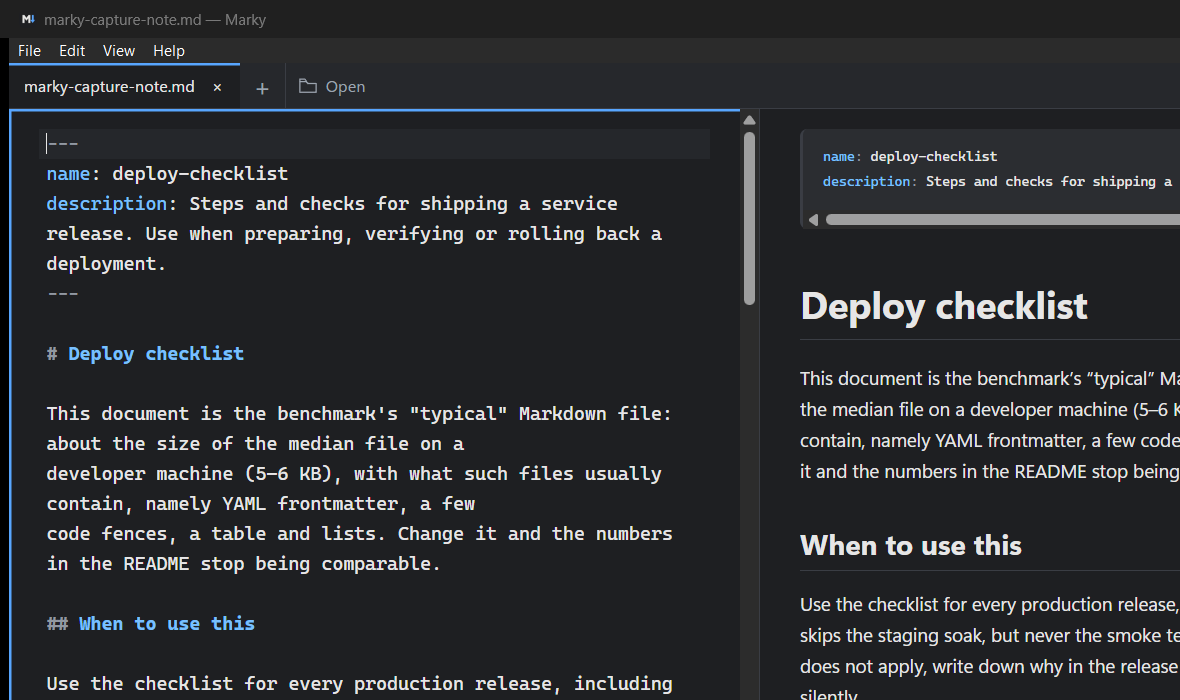
Scrolling stays in step with the editor. Tables, task lists, footnotes, Mermaid diagrams, KaTeX math.
| Build | Size |
| --- | --- |
| Installer | 4.46 MB |
| Program | 6.71 MB |

- [x] Startup holds
- [ ] Outline picks it up
Installer at 4.46 MB, program at 6.71 MB. Startup holds, outline picks it up.
Done: startup holds. Next: outline picks it up.
Remote images do not load. Markdown HTML stays off, so a note cannot phone home.
Web and email links open outside the app. Relative links stay limited to Markdown and text files already opened.
The log lives at %LOCALAPPDATA% on the machine. It can hold file paths from errors, never document text.
When a file changes on disk, Marky asks before reloading or keeping. Unsaved work always gets a prompt first.
Release build, i5-9300H with 16 GB RAM, 5 KB sample. Medians of 5 to 7 runs.
| Metric | Measured | Target | Limit |
|---|---|---|---|
| Installer | 4.46 MB | 6 MB or less | 10 MB |
| Program | 6.71 MB | 8 MB or less | 12 MB |
| Window visible | 187 ms | 300 ms or less | 500 ms |
| Dark-mode flash | 0 ms | 0 ms | 0 ms |
| Startup, ready to edit | 815 ms | 900 ms or less | 1,000 ms |
The app works from the keyboard throughout, including Tab, arrows, Home, End, and Delete.
17 of 17 shown
The Windows installer (Marky x64 setup) or the portable ZIP from the releases page. The installer runs per-user and needs no administrator access.
The WebView2 Runtime. The installer can fetch it. Releases are unsigned, so SmartScreen asks once: choose More info, then Run anyway.
Settings sit under %APPDATA% and the log under %LOCALAPPDATA%. Browser mode keeps files in memory instead.
Yes, MIT licensed with third-party notices shipped in the app. The source, changelog, and contributor guide are on GitHub.
Twenty tabs, a preview that keeps up, and nothing leaves the machine. v0.3.3 is on the releases page now.